
Overview
Use Chamfr’s RFQ tool when you need a custom component, cannot find a listed product that meets your requirements, or need a supplier to review your specifications before confirming pricing or availability.
You must be signed in to a Chamfr account to submit an RFQ. Enter your requirements, upload any supporting files, and submit the request. Chamfr then routes the RFQ to the applicable supplier or suppliers for review.
Chamfr is a marketplace. Suppliers control their own capabilities, specifications, pricing, minimum order quantities, inventory, lead times, and responses. Learn more about how Chamfr works.
When should I submit an RFQ?
Submit an RFQ when your request is not covered by a standard product listing.
This may include:
- A product that is not currently listed on Chamfr
- A custom size, material, or configuration
- A different quantity or pack size than what is listed
- A production-volume request
- A request that requires supplier review before pricing or lead time can be confirmed
If the product is already listed and the available quantity, pricing, and ordering options work for your needs, you can place the order directly through Chamfr checkout. If you need a formal quote to issue a purchase order (PO), see how to get a quote for a listed product on Chamfr.
Where can I start an RFQ?
You can start an RFQ from several places on Chamfr.
Request a Quote page
Use the main Request a Quote page when you know what you need but are not starting from a specific product or supplier.
Product category page
If you are browsing a product category and do not see the exact option you need, you can start an RFQ from the category page.
Product page
Use the RFQ option on a product page when you want to send your request to the supplier associated with that product.
An RFQ submitted from a specific supplier’s product page is sent only to that supplier.
For a technical question about a listed product, use Contact Seller instead. Contact Seller is the better option when you need clarification about specifications, materials, dimensions, compatibility, drawings, or documentation for an existing listing as suppliers are best equipped to answer technical questions about their products. Learn how to ask a technical product question.
Supplier directory
If you know which supplier you want to contact, find the supplier in the Chamfr Supplier Directory and start an RFQ from the supplier’s listing.
How do I submit an RFQ?
1. Sign in to your Chamfr account
You must be signed in to submit an RFQ.
If you do not already have an account, create one before beginning the request.
2. Choose the product type
Select the type of component or product you need.
Choosing the closest available product category helps route your request to suppliers that may have the appropriate capabilities.
3. Enter your specifications
Provide the details suppliers need to evaluate your request.
Depending on the product, this may include:
- Material
- Dimensions
- Tolerances
- Quantity
- Configuration
- Performance requirements
- Intended application
- Target delivery date
- Documentation or certification requirements
Include as much relevant detail as possible. Complete specifications make it easier for suppliers to understand the request and determine whether they can support it.
4. Upload supporting files
Add files that help explain the component or requirement.
Supported file types are:
- JPG
- JPEG
- PNG
- DWG
- IGS
- IGES
- STEP
The maximum file size is 50 MB.
Helpful files may include:
- Drawings
- CAD files
- Reference images
- Photos
- Sketches
- Specifications or requirement documents
Chamfr does not facilitate nondisclosure agreements between buyers and suppliers. Do not upload proprietary or confidential information unless you are authorized to share it and are comfortable providing it directly to the supplier or suppliers receiving the RFQ.
5. Review and submit your request
Review your contact information, specifications, quantity, and uploaded files before submitting the RFQ.
After submission, Chamfr routes the request to the applicable supplier or suppliers for review.
What information helps suppliers provide an accurate quote?Include the information that could affect manufacturability, pricing, quantity, or lead time.
At a minimum, provide:
- The product or component type
- Material requirements
- Dimensions and tolerances
- Quantity needed
- Important design or performance requirements
- Supporting drawings or reference files
- Your preferred timeline
If information is missing, suppliers may need to contact you before they can determine whether they can support the request or provide pricing.
What happens after I submit an RFQ?
After you submit an RFQ, the request is routed to the applicable supplier or suppliers for review.
Suppliers may contact you to:
- Ask for additional specifications
- Clarify dimensions, materials, or quantities
- Request a drawing or supporting file
- Confirm their capabilities
- Discuss lead time or minimum order quantity
- Provide pricing or a formal quote
Supplier response times vary based on the request’s complexity, the information provided, and the supplier’s availability. Chamfr does not control supplier pricing, capabilities, lead times, or response times.
Where can I view my RFQs?
To view your submitted RFQs:
- Sign in to your Chamfr account.
- Open the account menu.
- Select My Quotes.
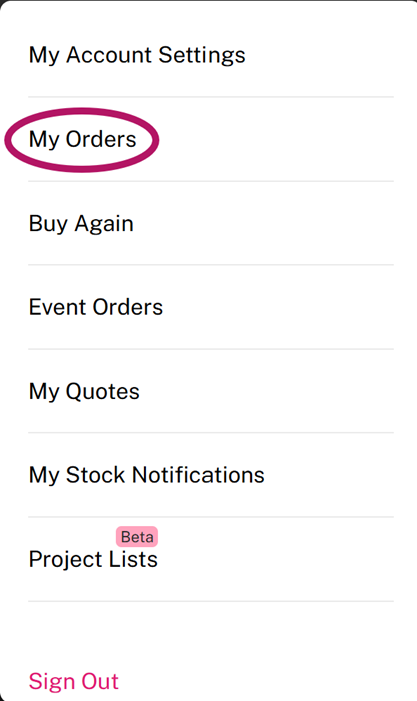
You can also open the Quotes section from your account dashboard.
Where will I receive supplier responses?
Supplier responses may be sent to the email address associated with your Chamfr account. Some responses may also appear in My Quotes.
Not every supplier response will necessarily appear in the dashboard, so check both your Chamfr account and your email. Check your spam or junk folder as well if you are expecting a response.
Can more than one supplier receive my RFQ?
It depends on where you start the request.
An RFQ submitted from a specific supplier’s product page is sent only to that supplier.
An RFQ submitted through a general RFQ form or product category may be routed to relevant suppliers that may be able to support the request.
How long does it take to receive a quote?
Quote timing varies by supplier and request complexity.
Providing complete specifications, quantities, drawings, and reference files can help suppliers evaluate the request more efficiently. Chamfr cannot guarantee when a supplier will respond or provide a quote.
What if I need help with an RFQ?
Contact Chamfr support if:
- You cannot submit the RFQ form
- A file will not upload
- You cannot access My Quotes
- Your RFQ does not appear in your account
- You need help confirming whether the request was routed
- You are unsure whether to use RFQ or Contact Seller
- You have another account or platform issue affecting the RFQ process
Email support@chamfr.com or use the Chamfr contact page.
For questions about pricing, technical requirements, capabilities, quantities, or lead times, communicate directly with the supplier.
What should I do next?
Submit an RFQ if your request requires a custom component, a product that is not listed, a different quantity or configuration, or supplier review.
If the product is already listed and the available options work for your needs, place the order directly through checkout. See what happens after you place an order.
If you have a technical question about a listed product, use Contact Seller on the product page.